Flag football scoreboard overlay for live streaming
Professional flag football scoreboard for your live stream
Track score, quarters, down, possession, and penalty flags from your browser. Add the overlay to OBS, Streamlabs, or vMix in seconds.
- Works with OBS
- Browser-based
- No install
- Free to start
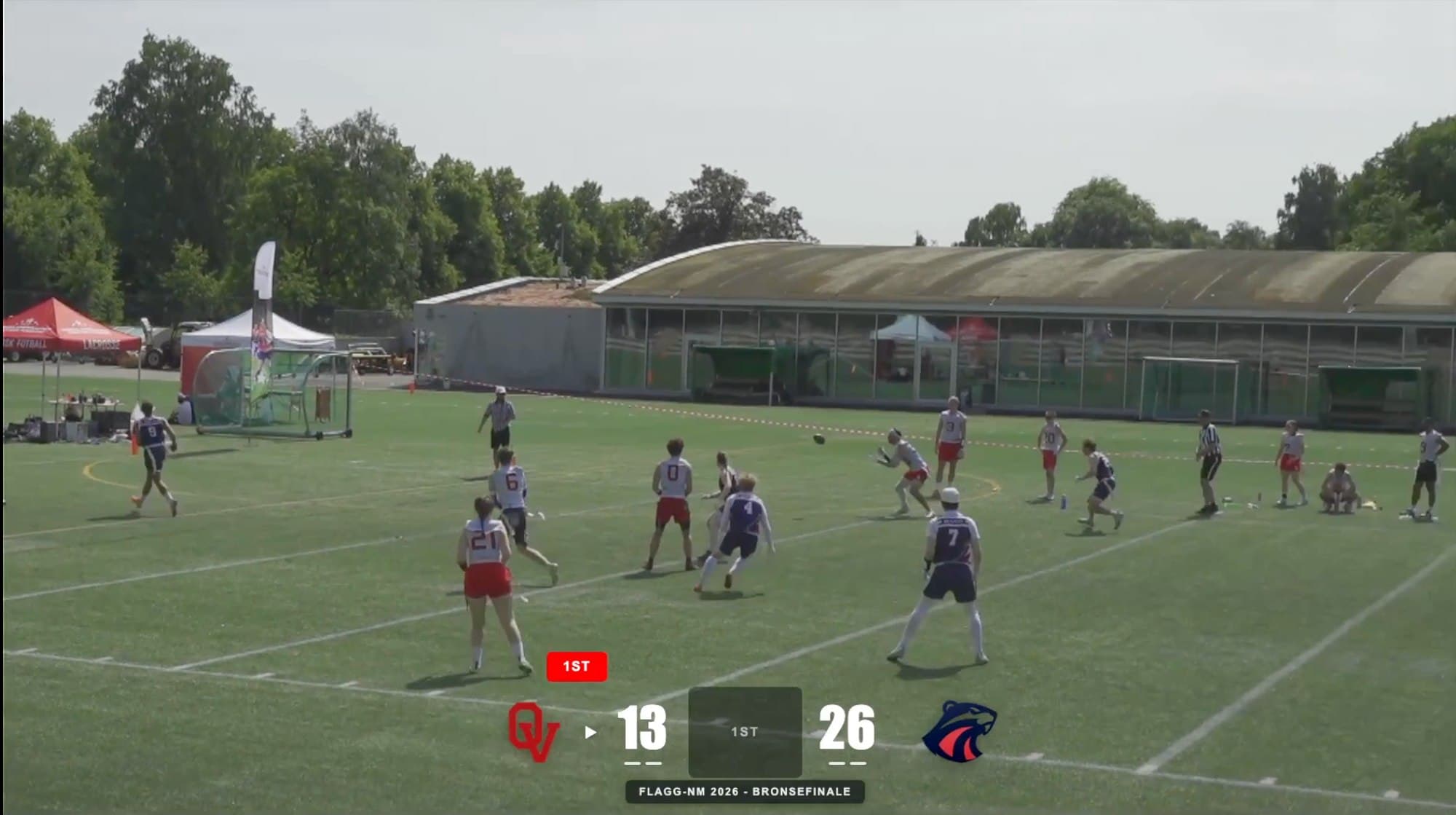
Built for flag football broadcasters
- National championship broadcasts
- Club and league streams
- Youth flag football tournaments
- School and college leagues
- Local community broadcasts
- Amateur league productions
Trusted by clubs and broadcasters

“ScoreLayer worked perfectly for us all through our streaming of the Norwegian Flag Football Championships! I really like that the logos and scores don't have a white background box around them - it lets you see more of the field.”
Travis Cornwell — Head of Club Development, Norwegian Federation of American Sports
“We're really happy with ScoreLayer! Getting started was easy, and we're now able to produce a professional looking stream for our Elite team with our one-person streaming team. ScoreLayer have also been very responsive to our questions and requests for new features (they even created the FOX style overlay at our request).”
Joachim Løvf — Chairman Of The Board, Oslo Vikings American Football Club
Five layouts. One stream.
Classic Scorebug, Compact, Fox Style, CBS Style, and ESPN 2018 — try each one live below using the tabs, and pick the look that fits your production.
The full broadcast bar. Team names, score, clock, down & distance, and timeout pips — every detail your viewers expect.
Everything you need for a professional flag football stream
No spotter. No graphics desk. Just a browser tab.
Score & Quarter Tracking
Track scores and the current quarter (1st–4th, OT) with one-click controls. Update the score the moment the play ends.
Down Tracking
Show the current down on the scorebug and update it instantly after each play — no distance clutter, just what flag football actually needs.
Possession Indicator
Show which team has the ball with a live possession marker that updates instantly on stream.
Penalty Flag Indicator
Flag a play with one tap — a clear flag indicator appears on the overlay so viewers know a call is under review.
Timeout Tracking
Track each team's two timeouts and display them on the overlay so viewers always know the game situation.
Custom Team Names & Logos
Set home and away team names before kickoff. Upload PNG or JPG team logos — they appear immediately in the overlay.
Touchdown Celebration
Hit the TD button and a full-screen TOUCHDOWN overlay fires in team colors — logo, giant letters, the whole moment. Auto-clears after 5 seconds. Your stream gets what it deserves.
On air in under 2 minutes
- 1
Open the Control Panel
Go to ScoreLayer and open the control panel in your browser. Set your team names, colors, and logos before kickoff.
- 2
Add a Browser Source in OBS
In OBS Studio, add a new Browser Source. Paste your ScoreLayer overlay URL and set the width and height to match your stream resolution.
- 3
Go Live
Start your stream. Use the control panel to update the score, quarter, down, possession, and flags — your overlay updates live on stream.
Frequently Asked Questions
- What is a flag football scoreboard overlay?
- A flag football scoreboard overlay is a graphic that sits on top of your live stream video, showing the current score, quarter, down, possession, and flag status — just like a broadcast on TV. ScoreLayer renders this as a transparent browser source you add to OBS, Streamlabs, or vMix.
- Does ScoreLayer work with OBS Studio for flag football streams?
- Yes. Add ScoreLayer as a Browser Source in OBS Studio. The overlay has a transparent background so it composites cleanly over your camera feed or field footage. You control the score, quarter, down, and possession from a separate control panel tab — no need to touch OBS during the game.
- Can I track downs on the scorebug?
- Yes. The ScoreLayer control panel lets you update the current down (1st through 4th) after each play. The scorebug updates live on stream so your viewers always know the game situation. Flag football does not need yardage tracking, so ScoreLayer shows just the down — no distance clutter.
- Can I show possession and penalty flags?
- Yes. ScoreLayer has a possession indicator that shows which team has the ball, and a penalty flag toggle that displays a clear flag indicator on the overlay whenever a call is under review. ScoreLayer also tracks each team's two timeouts, the standard for flag football. All three can be shown or hidden independently, so you only display what your production needs.
- Do I need to install any software?
- No. ScoreLayer runs entirely in the browser. You just add a URL as a browser source in your streaming software — there is nothing to download, install, or configure on your computer. The browser source displays your flag football scorebug — score, quarter, down, possession, and team branding — transparently over your camera feed.
- Does it work with Streamlabs and vMix?
- Yes. Any streaming software that supports a browser source or web URL input works with ScoreLayer. This includes Streamlabs, vMix, Wirecast, and most other professional streaming tools. ScoreLayer has been used to stream national flag football championship games with vMix and OBS productions alike.
- Can I use ScoreLayer if I only need a basic score display, without game clock or play-by-play indicators?
- Absolutely. ScoreLayer is fully customizable — you can run a minimal score-only overlay or enable the full suite of flag football scoreboard features including game clock, down tracking, possession indicator, penalty flag, and timeout tracking. Show exactly what your production needs, nothing more.
Ready to level up your flag football stream?
Add a professional flag football scoreboard overlay to your next game. Free to try — no software install required.
Create scoreboard